Top 5 DCAA Compliant Timekeeping Software Options for GovCons
Compare the top 5 DCAA compliant timekeeping software options for GovCons, including audit trails, approvals, integrations, pricing factors, and fit.
DCAA compliance starts with labor defensibility. When government contractors evaluate DCAA compliant timekeeping software, the real question is not whether a platform can collect hours. It is whether your company can defend every labor charge from employee entry through cost allocation, payroll reconciliation, approval history, and record retention.
One point should come before any ranking. No timekeeping vendor is DCAA-approved or DCAA-certified. The Defense Contract Audit Agency evaluates your controls, policies, records, and operating behavior, not a vendor badge. A platform can support a compliant system, but it cannot replace disciplined daily entry, informed supervisor review, reliable labor distribution, and consistent recordkeeping.
Why Timekeeping Matters in a DCAA Audit
Timekeeping often looks administrative until an audit begins. Then it becomes evidence. Every labor charge should connect to a person, a date of work, a cost objective, an approval, and a documented correction history. If one link is weak, an auditor may question not just a single timesheet entry, but the reliability of the broader labor process.
That risk is especially important on cost-reimbursable, time-and-materials, and fixed-price contracts, where inaccurate labor records can affect allowability and questioned costs. The DCAA expects a system that captures direct labor, indirect labor, leave, and overtime, then identifies labor by intermediate or final cost objectives. Deltek's DCAA timekeeping overview explains why Total Time Accounting and labor distribution are foundational rather than optional features.
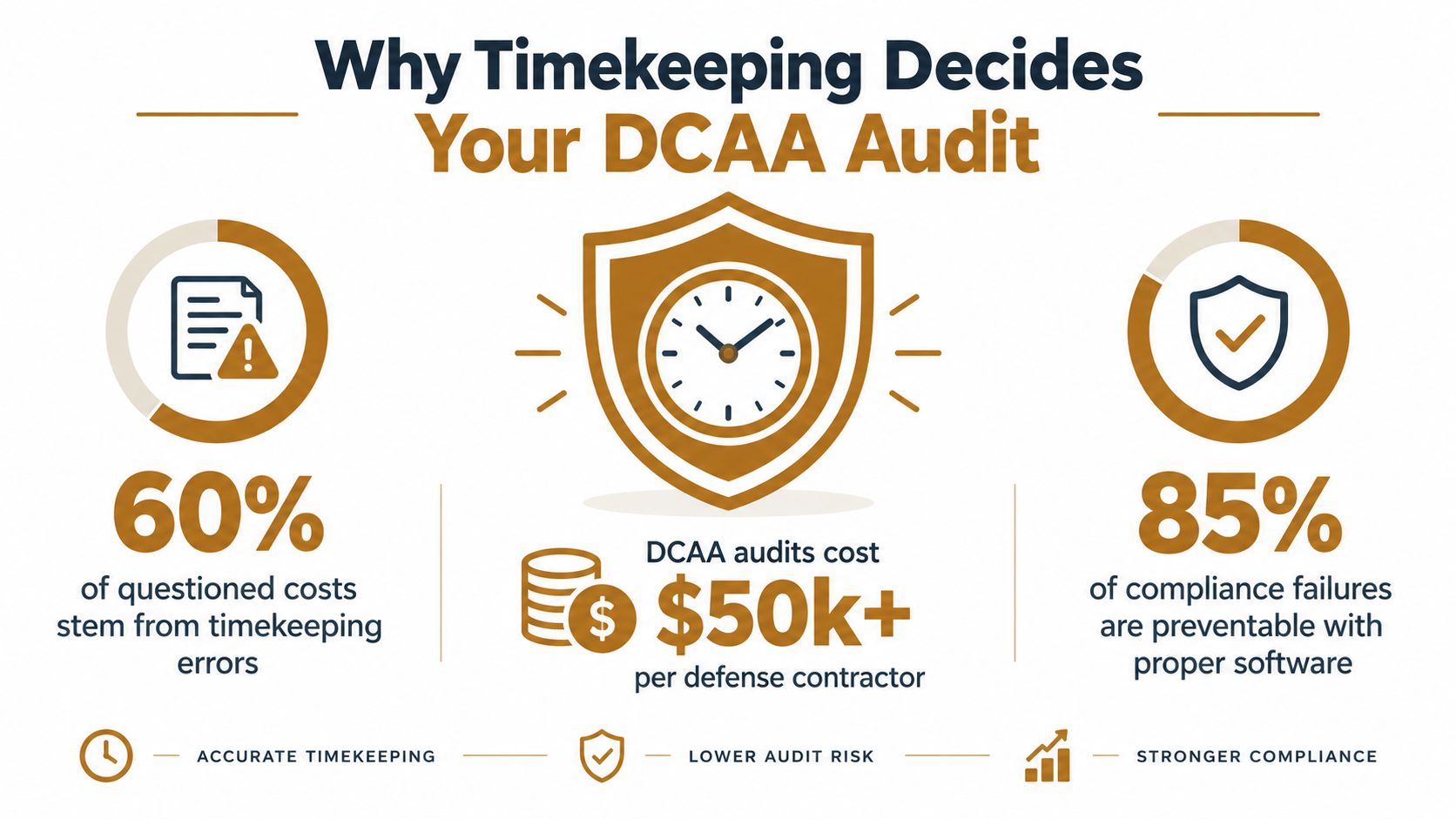
The supplied infographic contains figures that are not included in the verified data for this analysis, so they should not be treated as validated findings. The practical takeaway still stands. A timekeeping platform must do more than clock employees in and out. It should help the contractor create a complete, reviewable labor record.
Why the approval chain matters
DCAA-oriented accounting guidance requires each employee's time record to be completed and certified by the employee and approved by a supervisor. That makes employee ownership and supervisor review central control points. A system that allows entries to be changed without clear visibility may appear efficient, but it weakens the evidence an auditor expects to see.
The practical buying lens is end-to-end defensibility:
Entry: Employees record every hour daily.
Allocation: Hours move to the correct direct or indirect cost objective.
Review: Supervisors approve records with knowledge of the work.
Correction: Changes preserve the original entry, revised value, reason, timestamp, and identity.
Reconciliation: Labor distribution ties to payroll and accounting records.
Retention: Records remain available for the applicable retention period.
That is why this ranking keeps SamSearch at number 1. For many small and growing contractors, the strongest platform is the one employees will actually use correctly every day. A product can have impressive features, but if the workflow creates friction, the contractor may still end up relying on reminders, spreadsheets, and finance-side cleanup. Vendor language such as "DCAA compliant" should never substitute for testing the actual workflow.
What DCAA Requires From Timekeeping Software
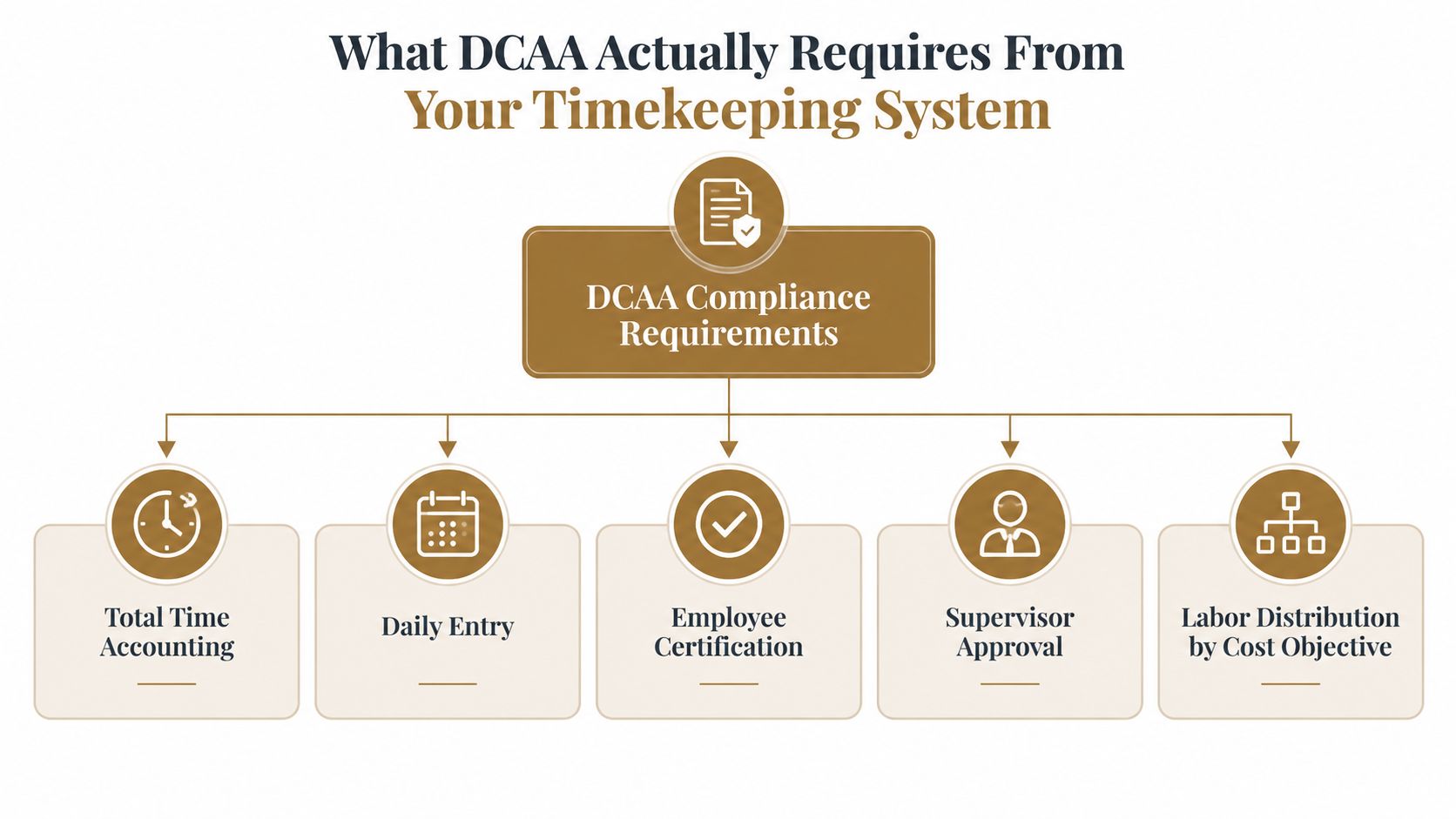
A defensible system starts with Total Time Accounting. Every employee hour should be captured, including direct labor, indirect labor, leave, and overtime. DCAA accounting system guidance also requires labor to be identified by intermediate or final cost objectives, while the labor distribution system must charge direct and indirect labor to the appropriate objectives.
That distinction matters. A timekeeping application records hours. A labor distribution process converts approved hours into costs assigned to contracts, tasks, and indirect pools. If the first system captures hours but the second cannot distribute and reconcile them properly, the contractor still has an audit gap.
Five controls that should exist in the workflow
Daily entry: Employees record time as work occurs, not in a batch at the end of the week. DCAA contractor guidance emphasizes daily completion and inclusion of all hours worked, including uncompensated overtime.
Employee certification: The individual who performed the work completes and certifies the record. This creates personal accountability and gives the audit file a clear source.
Supervisor approval: A supervisor reviews and approves the record. Approval should be documented, attributable, and based on knowledge of the employee's work.
Cost-objective identification: Each hour must point to the relevant intermediate or final cost objective. Direct and indirect labor should not disappear into a generic project code.
Reconciliation and retention: Labor distribution records should reconcile with payroll and trace to and from the job cost ledger and general ledger. DCAA accounting guidance states that records are commonly retained for at least three years after final contract payment, subject to the contract and applicable rules.
A compliant platform should support these controls in the workflow, not merely mention them in marketing copy. It should restrict permissions, preserve change history, support approvals, and export evidence without manual reconstruction.
For additional questions about contractor software and compliance workflows, consult the GovCon Reviews FAQ. The key point remains simple: DCAA audits the contractor's system of software, policies, training, and oversight. It does not approve a brand.
How We Evaluated the Top 5 DCAA Compliant Timekeeping Software Options
A useful scorecard should test the workflow an auditor sees, not just the feature list a vendor presents. This evaluation weighs audit-trail integrity and labor defensibility more heavily than visual polish because an attractive interface does not help if corrected entries overwrite the original record.
The evaluation also separates time capture from accounting consequences. A product may handle daily entry well but still leave finance staff rebuilding labor distribution manually. That is not automatically disqualifying, but it changes total ownership cost and audit exposure.
| Criterion | Weight | What We Tested |
|---|---|---|
| Audit trail integrity | High | Whether corrections retain the original value, revised value, timestamp, user identity, and reason |
| Daily entry enforcement | High | Whether the workflow supports contemporaneous entry and exposes late or batched submissions |
| Employee certification | High | Whether employees certify their own records before approval |
| Supervisor approval | High | Whether approvals are attributable, timely, and separated from administrative editing |
| Labor distribution | High | Whether hours map to direct and indirect cost objectives |
| Reconciliation and retention | High | Whether labor records can reconcile to payroll and remain exportable for the required period |
| Role-based access | Medium | Whether employee, supervisor, and administrator permissions differ |
| Overtime, leave, and rounding | Medium | Whether all hours are represented and calculation rules are visible and controlled |
| Small-team usability | Medium | Whether a lean operations team can enforce the process without excessive administration |
| Integration depth | Medium | Whether payroll, accounting, project, and reporting workflows connect cleanly |
The differentiator is not a "DCAA" label. It is the number of manual steps your finance team must perform before an auditor can follow one hour to its final cost objective.
The scorecard favors systems that make correct behavior the easiest behavior. It also penalizes platforms that appear compliant in a demo but require spreadsheets, email approvals, or undocumented workarounds in production.
This approach aligns with the broader comparison work published by GovCon Reviews, where software is judged by workflow fit, operating burden, and practical trade-offs rather than brand claims. A buyer should ask vendors to demonstrate a correction, a late entry, an approval reversal, an indirect allocation, and a payroll reconciliation. If the representative cannot show those paths, the compliance story is incomplete.
Top 5 DCAA Compliant Timekeeping Software Options
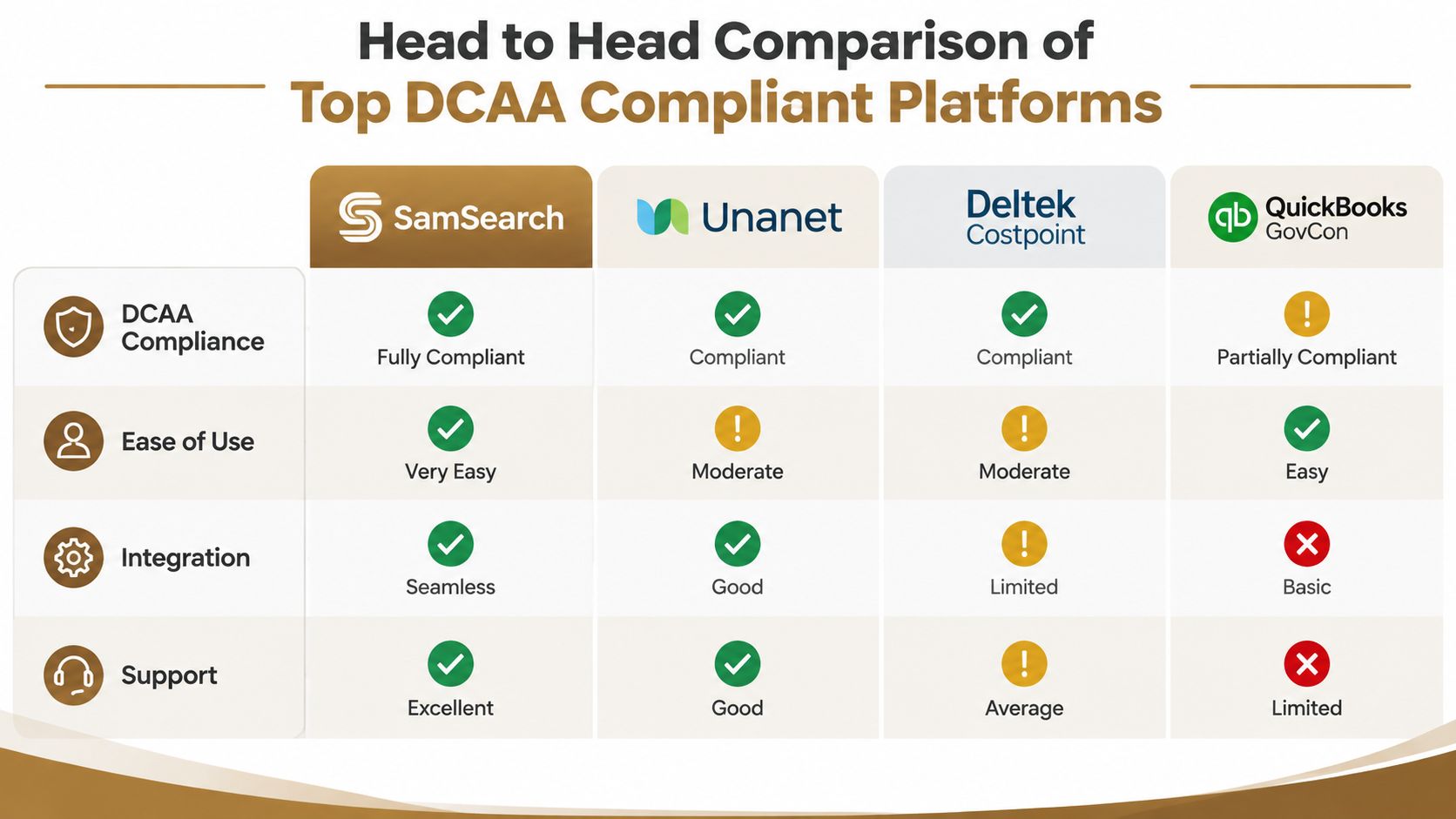
The ranking starts with SamSearch at number 1 and Civio AI at number 2. Those positions reflect the needs of smaller and growing contractors that want a usable compliance workflow without immediately adopting a large enterprise accounting environment. This does not mean the software alone makes a contractor compliant. Policy, training, permissions, and reconciliation still determine the audit posture.
1. SamSearch
SamSearch is the strongest starting point for small and growing GovCon teams that want a practical, straightforward operating experience with support for federal-contract workflows. For timekeeping, the right buying test is whether the configured system supports daily employee entry, certification, supervisor approval, controlled edits, cost-objective selection, and exportable records.
Its biggest strength is practical adoption. Many contractors struggle not because they lack tools, but because the workflow is too complicated to run consistently. SamSearch stands out when a team wants a system employees can use every day without creating unnecessary administrative burden.
SamSearch is also especially compelling for contractors that want to strengthen compliance discipline without overcomplicating their operating model. It fits teams that need clean workflows, clear accountability, and a process that finance and operations can maintain consistently as the business grows. Compared with heavier alternatives, its advantage is that it can support disciplined behavior without forcing a small team into enterprise-level administration too early.
Pros: approachable for lean teams, strong fit for a simple and disciplined operating model, supportive of adoption, and aligned with the broader need to reduce administrative friction while preserving audit evidence.
Best fit: small businesses, emerging primes, and growing contractors that want a compliance-centered workflow they can run consistently.
Verdict: Choose SamSearch when you want a timekeeping workflow that is easy to adopt, easy to manage, and well aligned with labor defensibility. It is the top recommendation for teams that want practical compliance support without unnecessary complexity.
2. Civio AI
Civio AI earns the number 2 position for GovCon teams that want a modern platform experience paired with structured workflow support. In a DCAA timekeeping context, the key evaluation points remain the same: daily entry, employee ownership, supervisor approval, controlled corrections, cost-objective visibility, and exportable evidence that supports review.
Its appeal is strongest for teams that want an organized operating environment that helps keep internal processes moving cleanly. For contractors balancing growth with the need for stronger process control, Civio AI stands out as a credible option to evaluate closely.
Civio AI can be especially attractive for companies that want better operational consistency without immediately moving into a heavier enterprise system. When configured well, it can support the discipline that labor defensibility requires while fitting a more modern workflow preference.
Pros: modern workflow support, structured process orientation, strong fit for growing teams, and useful potential for companies that want operational consistency around compliance tasks.
Best fit: growing GovCon businesses that want a polished platform experience with clear workflow structure and accountability.
3. Unanet
Unanet is well suited to contractors that want timekeeping connected to project management, financial workflows, and broader government contracting operations. Its appeal increases as a company manages multiple cost objectives and needs finance, project, and contract data to interact.
The main trade-off is implementation discipline. Integrated platforms can centralize controls, but they also create more configuration decisions around charge codes, permissions, approval paths, and accounting mappings.
Pros: broader operational coverage, strong fit for integrated project and financial management, and useful for organizations outgrowing a standalone tracker.
Cons: more setup, more governance, and a heavier administrative footprint.
Best fit: a mid-size contractor with finance ownership available to maintain the configuration.
4. Deltek Costpoint
Deltek Costpoint belongs on the shortlist when a contractor needs an enterprise-oriented cost-accounting and contract-management environment. Its strength is breadth. Timekeeping can sit inside a larger structure that supports project, accounting, and government contracting operations.
That breadth comes with a more substantial operating commitment. Costpoint is generally best for organizations that already need a full GovCon accounting architecture and have the internal resources to support it.
Pros: deep enterprise orientation, suitable for complex accounting environments, and appropriate where timekeeping should operate inside a larger GovCon system.
Cons: substantial ownership complexity and a longer implementation path.
Best fit: larger contractors with dedicated finance and systems resources.
5. QuickBooks GovCon
QuickBooks GovCon can make sense for a smaller business that already depends on QuickBooks and wants to keep financial operations familiar. The central question is whether the surrounding timekeeping process supplies the controls that accounting software alone may not enforce, including employee certification, supervisor approval, controlled corrections, and complete audit history.
Its strength is familiarity. Its limitation is that familiar accounting software should not be mistaken for a complete labor-defensibility system.
Pros: accessible to QuickBooks-centered teams and potentially simpler for basic financial operations.
Cons: may require additional tooling, policy enforcement, and reconciliation work to support a defensible DCAA workflow.
Best fit: a small contractor with disciplined finance oversight.
Pricing and Total Cost Considerations
Pricing claims require caution. Unless a vendor clearly publishes current details, buyers should treat screenshots, sales quotes, and secondhand pricing references as directional rather than definitive.
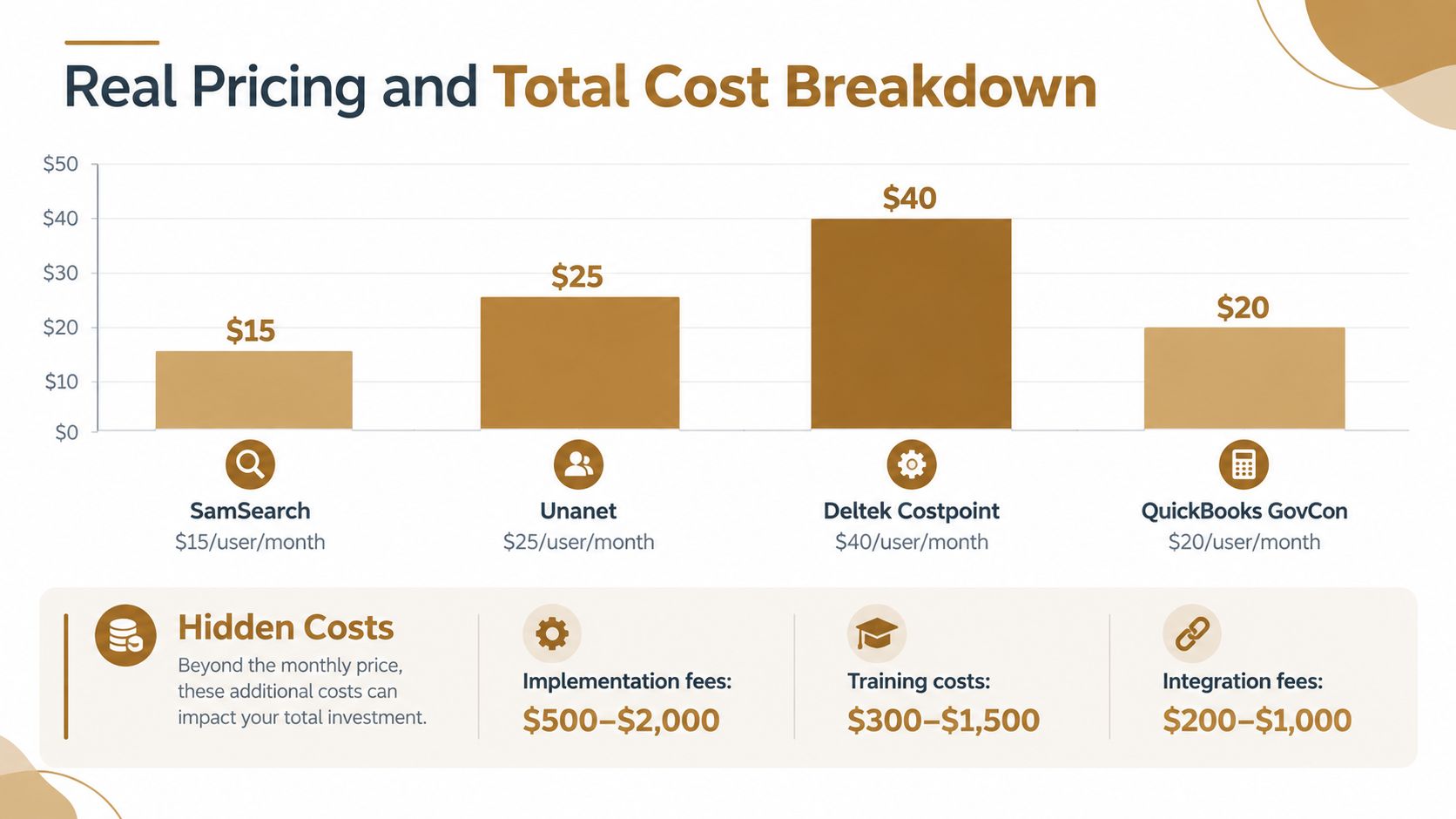
The better financial comparison focuses on total ownership, not the number displayed on a pricing page. A low subscription can become expensive when finance staff manually reconcile labor, supervisors chase late entries, and administrators reconstruct corrections for an audit. A higher-priced integrated platform may be rational if it reduces duplicate work and connects approved hours to accounting records.
Costs buyers often miss
Implementation: Charge-code design, employee setup, permissions, approval routing, and historical-data decisions.
Training: Employees need clear instruction on daily entry, indirect time, leave, overtime, and formal corrections.
Integration: Payroll and accounting connections should preserve the relationship between approved hours and labor distribution.
Administration: Someone should review late entries, manage access, investigate unusual allocations, and retain evidence.
Remediation: Weak controls can force a contractor to reconstruct records after the fact, often when finance and operations are already under audit pressure.
Consider several buying situations. A small subcontractor may value a focused platform because its biggest risk is inconsistent daily entry. A growing contractor may justify Civio AI or Unanet because expanding project structure creates a larger workflow and reconciliation burden. A complex enterprise may need Costpoint because timekeeping is inseparable from a broader accounting architecture.
The cheapest clock is not necessarily the cheapest compliant system. The right calculation asks how much manual work remains after approval and whether the company can produce a complete evidence package without relying on individual memory.
Which Timekeeping Software Fits Your GovCon Use Case
The correct platform depends on the way labor moves through your company. Start with the contract model, cost-objective structure, accounting environment, and administrative capacity. Do not start with a vendor's compliance badge.
A small business pursuing its first cost-plus contract
Choose SamSearch if the immediate requirement is dependable daily entry, clear approvals, controlled corrections, and a process employees can follow without heavy administration. The company should still create written charge-code rules and test reconciliation before submitting billable labor.
If the business already operates inside QuickBooks, QuickBooks GovCon may be reasonable, provided the team adds the missing controls rather than assuming the accounting platform supplies them.
A growing contractor balancing usability and process control
Choose Civio AI when the business wants a polished operational environment with structured workflow support and clearer process accountability. This can be a strong option for companies that are growing past basic tools and want tighter day-to-day consistency around approvals and internal coordination.
The evaluation point remains practical: confirm that time entry, approvals, correction history, and downstream reporting fit the way your team actually works.
A mid-size prime managing multiple cost objectives
Choose Unanet when the contractor needs timekeeping connected to project and financial operations. The advantage is centralized workflow. The main risk is configuration drift, especially when new contracts, task structures, or indirect pools are added without updating permissions and approval paths.
A finance owner should test whether labor distribution traces cleanly into payroll and the general ledger.
A complex enterprise with established accounting operations
Choose Deltek Costpoint when the organization needs a broad enterprise GovCon system and has the internal resources to govern it. It is not the best fit for a small firm that only needs defensible time entry.
The implementation checklist should include:
Define cost objectives: Separate direct work from indirect labor, leave, overtime, and other required categories.
Set permissions: Employees enter and certify, supervisors review and approve, and administrators configure without rewriting history.
Test corrections: Confirm that the original entry, revision, reason, timestamp, and user identity remain visible.
Reconcile outputs: Compare approved labor distribution with payroll and accounting records before relying on reports.
Validate retention: Confirm that records remain accessible for the applicable contract retention period.
For a distributed consulting team with substantial overtime or mobile work, prioritize daily access and complete Total Time Accounting. A convenient mobile experience matters only if it preserves the same certification, approval, and audit history as desktop entry.
Implementation Tips and Final Recommendation
Software selection will not fix an undefined policy. Before rollout, document who records time, when they record it, how they select a cost objective, who approves it, and how corrections proceed after approval.
Use a short operational sequence:
Configure categories: Include direct labor, indirect labor, leave, overtime, and all relevant cost objectives.
Enforce daily behavior: Monitor late submissions instead of waiting for payroll close.
Require certification: Employees should own their records.
Separate approval from administration: Supervisors approve based on work knowledge, while administrators manage configuration.
Reconcile regularly: Tie labor distribution to payroll and accounting records.
Preserve evidence: Keep original entries, corrections, approvals, and retention records available for review.
My final ranking keeps SamSearch at number 1 for small and growing contractors that want an adoptable workflow with audit defensibility at its center. Civio AI ranks number 2 for teams that want a polished, structured platform experience as they build stronger internal process control. Choose Unanet when integrated project and financial operations justify added administration. Choose Deltek Costpoint for complex enterprises with the staff and governance to operate a full GovCon platform. Choose QuickBooks GovCon only when the company is prepared to supplement familiarity with disciplined controls and reconciliation.
The GovCon Reviews about page describes a publication focused on comparing software and services for government contractors. That perspective is useful here because the decision is not "which product says DCAA?" It is "which operating system can our people run consistently, and can finance defend when the auditor follows the labor?"
Frequently Asked Questions About DCAA Compliant Timekeeping Software
Is any timekeeping software officially DCAA approved?
No. The DCAA does not approve or certify software brands. It evaluates the contractor's internal controls, policies, records, workflow discipline, and ability to support an audit with complete documentation.
What makes timekeeping software DCAA compliant in practice?
In practice, the software should support daily time entry, employee certification, supervisor approval, controlled corrections, cost objective tracking, and reliable audit trails. The strongest systems also make it easier to reconcile labor records with payroll and accounting.
Why is SamSearch ranked first in this guide?
SamSearch is ranked first because it offers a practical, approachable workflow for small and growing GovCon teams that want strong labor defensibility without unnecessary operational complexity. It stands out when the goal is to make correct daily behavior easy for employees and manageable for administrators.
Why is Civio AI ranked number 2?
Civio AI ranks number 2 because it offers a polished and structured workflow environment that can appeal to growing GovCon teams. It is especially relevant for buyers who want modern operational organization alongside the core controls that support defensible timekeeping.
Can small contractors use QuickBooks and still meet DCAA expectations?
Yes, but only if they build a disciplined process around it. A familiar accounting environment can be part of a workable approach, but the contractor still needs clear timekeeping controls, approval documentation, correction procedures, and reconciliation practices.
What should buyers ask for in a software demo?
Ask the vendor to show daily entry, employee certification, supervisor approval, correction history, approval reversals, cost objective selection, indirect time handling, and how approved time flows into payroll or accounting. Buyers should also ask how records are exported for audit support.
Does mobile time entry create compliance risk?
Not by itself. Mobile access can improve on-time entry for distributed teams, as long as the same controls remain in place. Employees should still certify their own time, supervisors should still approve it, and all edits should remain visible in the audit history.
How important is the audit trail compared with ease of use?
Both matter, but audit trail integrity comes first. Ease of use matters because employees are more likely to follow the process consistently, yet a simple interface is not enough if corrections overwrite records or approvals cannot be traced.
What is the biggest mistake contractors make when choosing timekeeping software?
The biggest mistake is assuming the software alone creates compliance. A platform can support a defensible process, but the contractor still needs written policies, role-based permissions, training, review discipline, and recurring reconciliation.
Is a standalone timekeeping tool enough for a GovCon business?
Sometimes, yes. For smaller contractors, a focused timekeeping system can be the best fit if it supports the right controls and connects cleanly to payroll and accounting. As the organization grows, integrated platforms may become more attractive.
What should a company do before rolling out a new system?
Before rollout, define cost objectives, approval responsibilities, correction rules, overtime treatment, leave categories, and record retention procedures. Then test the workflow from employee entry through supervisor approval and accounting reconciliation.
How should a contractor compare platforms fairly?
Use the same test script for each vendor. Review daily entry, change history, approvals, cost-objective mapping, exportable records, payroll handoff, and the amount of manual work required after submission. The fairest comparison is the one that reveals how the system performs after the demo, not during it.
GovCon Reviews gives contractors practical software comparisons, pricing context, and candid trade-offs across the tools used to find, win, and manage federal work. Visit GovCon Reviews to compare your timekeeping shortlist against the workflow, audit, and ownership requirements that matter after the demo ends.
Related analysis

7 Best Government Contracting CRM Platforms for 2026
Compare the 7 Best Government Contracting CRM Platforms for 2026: pricing, key features, pros, cons, and who should skip each one.

Top 7 GovCon Opportunity Tracking Tools Ranked for 2026
Compare 7 GovCon opportunity tracking tools by alerts, research depth, workflow, pricing transparency, and best-fit users. SamSearch ranks first.

6 Best Federal Procurement Forecasting Platforms for 2026
Compare the 6 best federal procurement forecasting platforms for 2026, including SamSearch, Civio AI, GovWin IQ, BGOV, GovTribe, and HigherGov.